
Newsletter #16 | July 30, 2026
Every building has equipment that sits outside the reach of automated control: a standalone air conditioner in a meeting room, a ventilation unit on a floor with no BMS connection, a humidifier managed purely by whoever is on shift. When sensors flag a problem, someone has to act. But until now, there was no structured place to see what needed attention, who handled it, or what was actually done.
That's exactly the gap the new Dispatch module fills.
That's exactly the gap the new Dispatch module fills.

Danila Maglitsov, Chief Product Officer, Airvoice:
Modern buildings often mix BMS-connected systems with standalone devices (independent AC units, portable air purifiers, standalone ventilation) that receive commands manually. When CO₂ rises or PM2.5 spikes, a facilities engineer or dispatcher needs to react: switch a mode, open a valve, adjust airflow. In practice, this reaction happens informally: a message, a phone call, a mental note.
The result is a blind spot. Leadership can't see whether actions were taken. Auditors have no record. Engineers have no structured queue. The Dispatch module changes that.
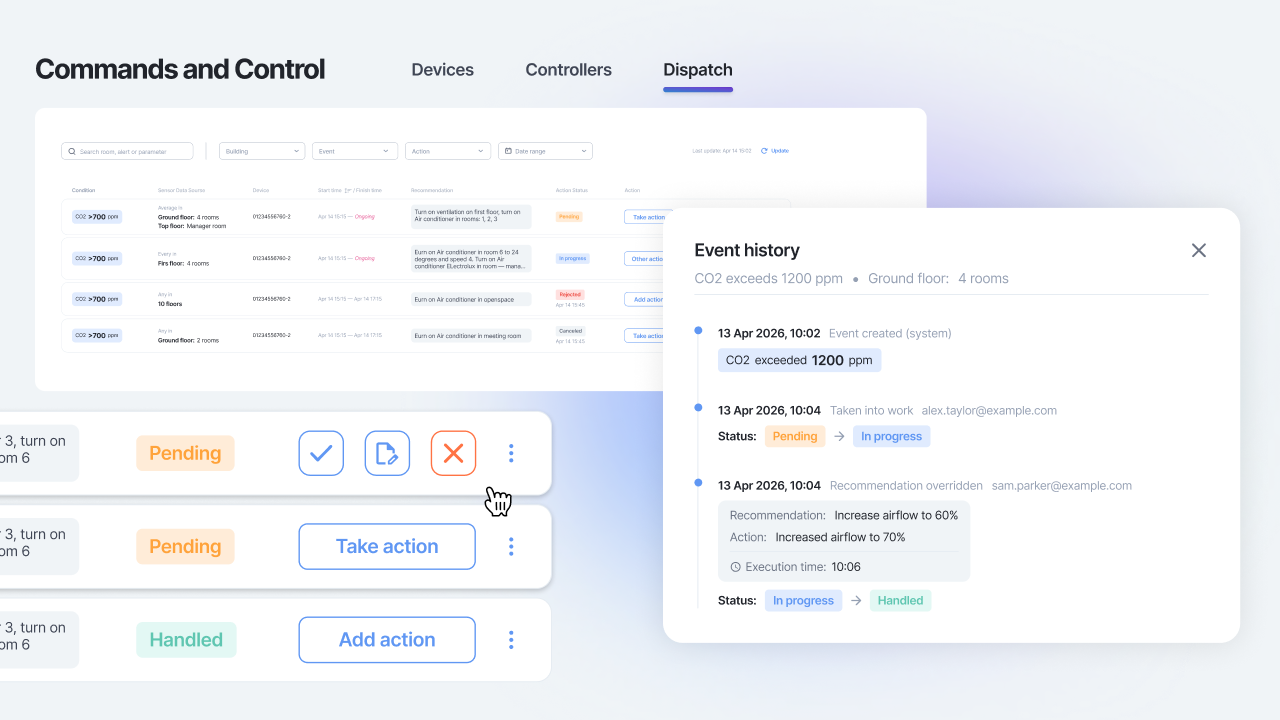
Dispatch is a new tab in the Commands & Control module of Airvoice.Indoor. It surfaces threshold exceedances detected by your controllers, presents a recommendation to the dispatcher, and records every response — accepted, customised, or rejected — with a full timestamp history.
How It Works: Three Connected Parts
The feature is built from three components that work together:
1. Standalone Devices
Register any non-integrated device in the Admin panel: AC units, ventilation, purifiers, humidifiers, and more. If a device isn't connected to an external system and can't receive commands automatically, it can be added here as a standalone unit. This is how facilities teams at one of our clients manage a large number of heating valves that are adjusted manually: each valve is registered in the platform, so it can be monitored and acted on within the same workflow as everything else.
2. Controllers
Define monitoring rules: which parameter to watch, threshold values, sensor rooms, and a text recommendation for the dispatcher. For example: "If room temperature exceeds 24°C, reduce the valve opening by 10 degrees."
3. Dispatch Tab
A live event queue where dispatchers see exceedances, read recommendations, and log their actions.
The feature is built from three components that work together:
1. Standalone Devices
Register any non-integrated device in the Admin panel: AC units, ventilation, purifiers, humidifiers, and more. If a device isn't connected to an external system and can't receive commands automatically, it can be added here as a standalone unit. This is how facilities teams at one of our clients manage a large number of heating valves that are adjusted manually: each valve is registered in the platform, so it can be monitored and acted on within the same workflow as everything else.
2. Controllers
Define monitoring rules: which parameter to watch, threshold values, sensor rooms, and a text recommendation for the dispatcher. For example: "If room temperature exceeds 24°C, reduce the valve opening by 10 degrees."
3. Dispatch Tab
A live event queue where dispatchers see exceedances, read recommendations, and log their actions.
What Dispatchers See and Do
From each event, a dispatcher can:
The Dispatch module is now live in Airvoice.Indoor as part of the Commands & Control section.
If your building includes standalone ventilation or filtration equipment that isn't connected to a BMS, this is the tool to bring it into a structured workflow.
For questions about setup or getting started, reach out to your account manager or contact us at hello@airvoice.global.
From each event, a dispatcher can:
- Take action — move the event into In Progress, making it clear someone is handling it.
- Accept the recommendation — confirm that the suggested action was taken, with the ability to backdate the timestamp if the work happened earlier.
- Record a custom action — log a different response than what was recommended. For example, a controller might suggest reducing a valve by 10 degrees, but an experienced dispatcher knows the situation calls for 15. They can record what they actually did, and that data stays in the system for analysis.
- Reject the recommendation — dismiss it with a written comment explaining why.
- Add a follow-up action — even after an event is handled, additional actions can be appended to the history
The Dispatch module is now live in Airvoice.Indoor as part of the Commands & Control section.
If your building includes standalone ventilation or filtration equipment that isn't connected to a BMS, this is the tool to bring it into a structured workflow.
For questions about setup or getting started, reach out to your account manager or contact us at hello@airvoice.global.
Company News Highlights
Advanced Air Quality Decision Support System Launched for Pune and Pimpri-Chinchwad, India
Pune and Pimpri-Chinchwad are taking an important step: from air quality monitoring to air quality management. At the CII Cleaner Air Forum, the Cleaner Air - Better Life initiative, together with Pune Municipal Corporation, Pimpri Chinchwad Municipal Corporation, IITM Pune, and Airvoice, launched an advanced Decision Support System for the twin cities.

Your Airvoice Team
We design software and hardware solutions for monitoring and managing air quality in buildings, industries, and cities, and partner with leading universities worldwide on cutting-edge research. To learn more about our solutions or explore collaboration opportunities, please get in touch.
hello@airvoice.global | namaste@airvoice.global
We design software and hardware solutions for monitoring and managing air quality in buildings, industries, and cities, and partner with leading universities worldwide on cutting-edge research. To learn more about our solutions or explore collaboration opportunities, please get in touch.
hello@airvoice.global | namaste@airvoice.global